Heuristic Evaluation
of Team 1’s Project:
By Lazlo Ring – lring@ccs.neu.edu
Nielsen’s Heuristics
1. Simple and Natural Dialogue:
a. Both screens are free of extraneous graphics.
Severity: NA.
2. Speak the User’s Language:
a. All terms in the system are appropriate for the target age group.
Severity: NA.
3. Minimize User Memory Load:
a. The user is required to currently remember what color they have selected.
Severity: Major.
4. Consistency
a. The system has a consistent look and feel.
Severity: NA.
5. Feedback
a. The system does not give feedback when you hold down your mouse on the main screen until the butterfly moves.
Severity: Major.
6. Clearly Marked Exits
a. The Go Back to The Garden button is never explained in the tutorial.
Severity: Minor.
7. Shortcuts
a. There does not seem to be any shortcuts in the system.
Severity: NA.
8. Good Error Messages
a. You cannot seem to get into a state that allows for an error to occur.
Severity: NA.
9. Prevent Errors:
a. No word filter on the name of the butterflies, could lead to problems depending on how the names are used.
Severity: Major.
b. Front screen instructions can appear under the butterflies.
Severity: Minor.
c. It may be hard to tell which parts of the butterfly you can paint on a touch screen. (I.E. which part I’m about to paint on when clicking on the fourth butterfly)
Severity: Major.
10. Help and Documentation:
a. The system provides help upon staying idle on every screen.
Severity: NA.
b. Instructions for the butterfly only appear after waiting idly on the create page instead of upon first viewing it.
Severity: Minor.
c. When the tutorial for create a butterfly is going, the “Next, pick a part…” instruction temporarily hides what you are currently working on.
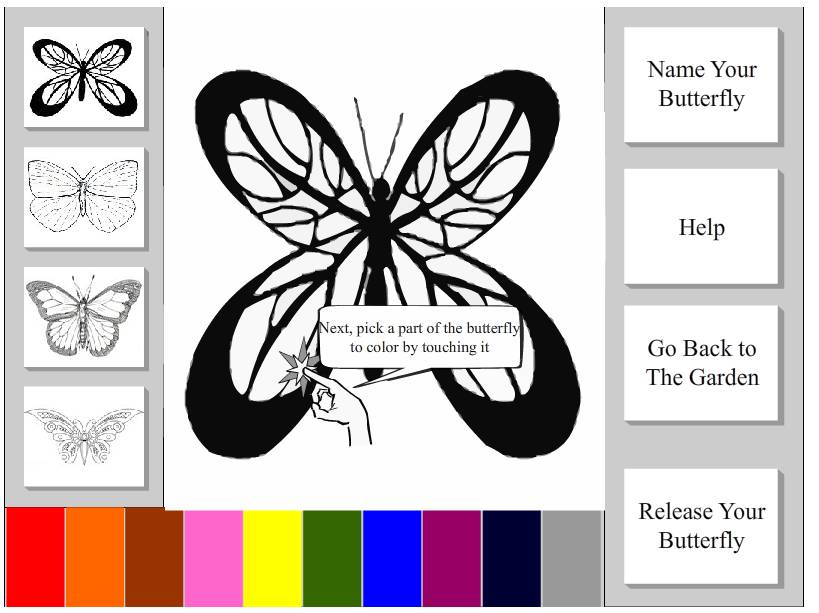
Severity: Major.
Additional Comments:
1. You cannot adjust the size of the butterfly to complete task 3.
Severity: Catastrophic.
2. Tasks 4 and 5 are not implemented.
Severity: Catastrophic.