Lab 9: The Dragon Fractal
Remember
- Work in Pairs
- Change roles often
- Follow the
design
recipe and/or the abstraction recipe
The Dragon Fractal...
Today you will design functions to draw
(and iterate) an interesting fractal design called
the Dragon. This was used on the headings of chapters
in the book Jurassic Park (if anyone
is old enough to remember
that...).
We start off building a simple line drawing program. Then
we'll combine pieces into the fractal's (generative)
recursion.
First, a direction (Dir) is a Symbol, one
of: 'left, 'right, 'up,
or 'down
-
Write the function,
rotate-dir, that rotates
a given Dir 90
degrees counter-clockwise (rotate to
the left). What are the four cases
of Dir and what should you return?
     ;; rotate-dir : Dir -> Dir
     ;; Rotate the given direction to the 'left' (counter-clockwise)
     (define (rotate-dir dir) ...)
-
Write the function,
rotate-dirs, that rotates
all the Dirs in a [Listof Dir]
counter-clockwise. Hint: Which loop function can
you use?
;; rotate-dirs : [Listof Dir] -> [Listof Dir]
-
Write the function,
move-posn, that returns
a Posn that is the result of moving the
given x and y in the
given Dir-ection, the given
amount, amt.
;; move-posn : Number Number Dir Number -> Posn
-
Write the function,
draw-dirs, that draws
lines of a desired color given a list of directions (in order) starting at
the given x and y into the given
scene.
Hint: Use structural recursion here, and choose
some constant amount for move-posn (say
3). You can use add-line to create the lines.
You'll need a bit of an accumulator too.
     ;; draw-dirs : [Listof Dir] Number Number Color Scene -> Scene
     ;; Draw lines of given color, following the given directions starting at (x,y) into
     ;;   the given Scene.
Here's some interactive stuff to test your functions... use the
arrow keys to create a path (a [Listof Dir]). You can
hit r to rotate all the points to the left.
     ;; Screen Size...
     (define W 400)
     (define H 400)

     ;; Draw wrapper
     (define (draw w)
       (local ((define lst (reverse w)))
         (draw-dirs lst (/ W 2) (/ H 2) "red" (empty-scene W H))))

     ;; Key Handler
     (define (key w ke)
       (cond [(key=? ke "up") (cons 'up w)]
             [(key=? ke "down") (cons 'down w)]
             [(key=? ke "left") (cons 'left w)]
             [(key=? ke "right") (cons 'right w)]
             [(key=? ke "r") (rotate-dirs w)]
             [else w]))

     (big-bang '()
               (to-draw draw)
               (on-key key))
Onward...
Now... We need to generate the fractal. Here's the pattern; the
blue number is the number of iterations run.
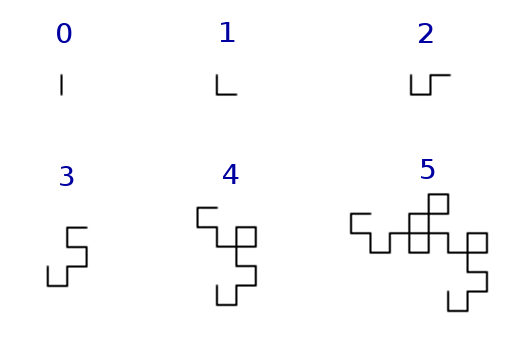 The algorithm takes a
 [Listof Dir] and
a Number that is the iterations left to be
done. To start the algorithm off we will pass it the
list '(down), and the number of iterations we
want.
It goes like this:
- If
iter is 0, then leave the list alone
- Otherwise, return a new list modified as follows:
- Rotate all the
Dirs from the old list
- Reverse the rotated list (remember
(reverse ...)?)
- Append the new reversed/rotated list on the end of the old list
- Recurse on the new list, and with one less
iter
-
Write the function,
jurassic
implements the algorithm above. You can
use local
to define each step separately,
then it will be clear that your function follows the
specification.
     ;; jurassic: [Listof Dir] Number -> [Listof Dir]
     ;; Compute the next iteration of the Jurassic Fractal, given a [Listof Dir]
     ;;   and the number of iterations left.
     (define (jurassic lod iter) ...)

     (check-expect (jurassic '(down) 0) '(down))
     (check-expect (jurassic '(down) 1) '(down right))
     (check-expect (jurassic '(down) 2) '(down right up right))
     (check-expect (jurassic '(down) 3) '(down right up right up left up right))
When you know it works, remove (or comment out) the
old big-bang code and replace it with this:
     (define (draw w)
     (local [(define lst1 (jurassic '(down) w))
             (define lst2 (rotate-dirs lst1))
             (define lst3 (rotate-dirs lst2))
             (define lst4 (rotate-dirs lst3))
             (define (draw-one lst color scn)
       (draw-dirs lst (/ W 2) (/ H 2) color scn))]
           (draw-one lst1 "red"
               (draw-one lst2 "green"
                   (draw-one lst3 "blue"
                       (draw-one lst4 "black" (empty-scene W H)))))))

     (define (key w ke)
       (cond [(key=? ke "up") (add1 w)]
             [(and (key=? ke "down") (> w 1))
              (sub1 w)]
             [else w]))

     (big-bang 0
               (to-draw draw)
               (on-key key))
Hit the up/down arrows to increase and decrease the number of iterations
run.
If you're done early...
When drawing the directions (draw-dirs) try
modifying the size and/or color of the lines to create interesting
drawings.
If you're done really early...
Try doing
the Koch
Snowflake fractal... that one's pretty fun, and a nice
challenge.